
Visual feedback tool for websites and design review
Leave feedback about your website, right on your website. It’s like adding sticky notes to a website, only better. Whenever you need feedback on your website about design, copy or features, simply click on any page element and add a note.
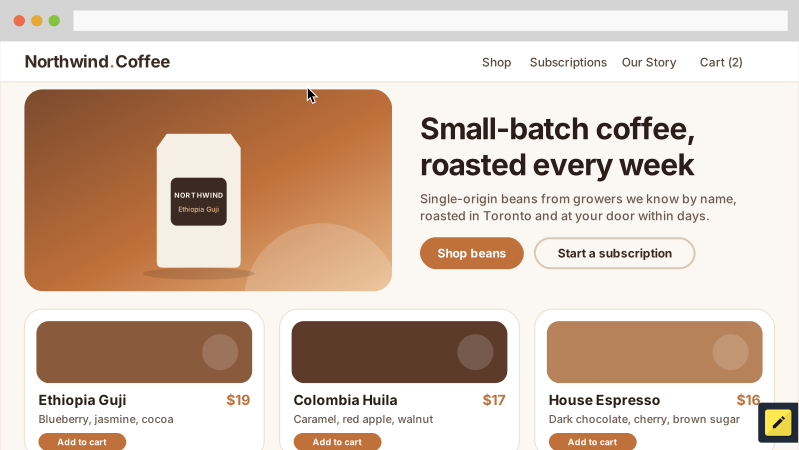
Save time with a simple visual feedback tool
It’s simple. After you add PageProofer to your website, click the icon and then double click anywhere to add a note. The note gets pinned to the element you clicked on, like a sticky note.
You can attach a file, screenshot or even a video screen recording. Inside each note you can add comments, have a conversation with your team and assign the note to someone if action needs to be taken.
With PageProofer you don’t need spreadsheets, documents and long email threads to keep track of feedback.
Every plan includes unlimited sites, with plans from $39/month. See pricing for the details.
How to collect visual feedback from clients
- Add PageProofer to your site. Paste the code snippet into your site, or use the Chrome/Edge extension on sites where you can’t add code.
- Share the site with your client. Clients can leave guest feedback without creating an account.
- Clients click an element to pin a note. The note is attached to the exact heading, image or button they clicked.
- The details are captured for you. Each note records the element’s CSS selector, a screenshot, the browser and device, and any console errors.
- Track it to done. Assign the note, talk it through in the comments and mark it complete when it’s fixed.
For the full process, see how to run a website design review on a live build.
Video feedback
Some feedback is easier to show than to type, like a hover effect that flickers or an animation that runs too fast. Reviewers can attach a screen recording to a note and talk through the problem as they go.
While recording, they can also draw on the page to circle or point at exactly what they mean. The drawing becomes part of the video.
Design feedback on the live site
Mockups can’t show everything. Some design problems only appear once the site is running in a real browser:
- Spacing and alignment that’s slightly off
- Hover and focus states that are missing or wrong
- Elements that overlap
- Animations that aren’t quite polished
- Layouts that break at certain screen sizes
These are also the things AI coding agents tend to miss. When an agent builds the site, a person reviews it and pins notes in PageProofer. Our MCP server hands each note, with its selector, screenshot and browser info, back to Claude Code or Cursor to fix, and the person checks the fix. See how it works with your AI agent.
I cannot imagine managing all of our project edits without PageProofer
 Sydney GruffyGoat
PageProofer makes internally QAing our clients' websites easier, quicker, and more organized.
 Mike Antenna
With PageProofer on your website, feedback stays in one place instead of scattered across emails and screenshots. Check out the features to learn more about how PageProofer can help streamline your website feedback process. Still deciding? Compare the best website feedback tools.

Easy to add
Simply add the PageProofer code snippet to your website and anyone can start leaving feedback on your website.

Click to leave feedback
Anytime you spot something on your website that needs to be called out just double click and add a note.

Faster feedback loops
By collecting, managing and assigning all the feedback right on your website there's no time lost in bouncing between your website, a spreadsheet and email.
PageProofer is a fantastic tool for our development toolbox. It gives us and our clients one simplified point for feedback creation, tracking, and sign-off.
 Joe Atomic Mouse
PageProofer made our QA and feedback process so much easier. It saves us a ton of time, and is very easy to use. Highly recommended.
 Sandra Market 8