
Trello bug tracking made easy!
We love Trello. They made Kanban boards popular (we even use Trello internally). With PageProofer, you can turn your Trello board into a powerful bug tracking solution for your website.
To be clear, this page is about tracking issues on your own website in Trello, not reporting bugs in the Trello app itself.
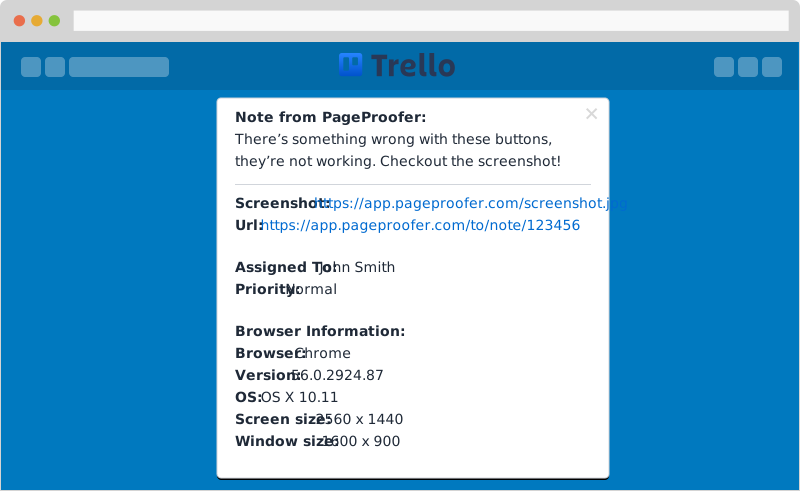
Bug tracking from your website
With our Trello integration, any time you add a note in PageProofer it will automatically be added to your Trello board. All the important browser information and screenshots get included.
How it works
- Install PageProofer. Add the PageProofer script to your site, or use the Chrome/Edge extension. See getting started and the browser extension guide.
- Pin a note on the live page. Click the problem on your website and describe what’s wrong. A screenshot and the browser info are captured automatically.
- The card appears in Trello. The note is added to your Trello board as a card, and comments added in PageProofer are added to the card too.
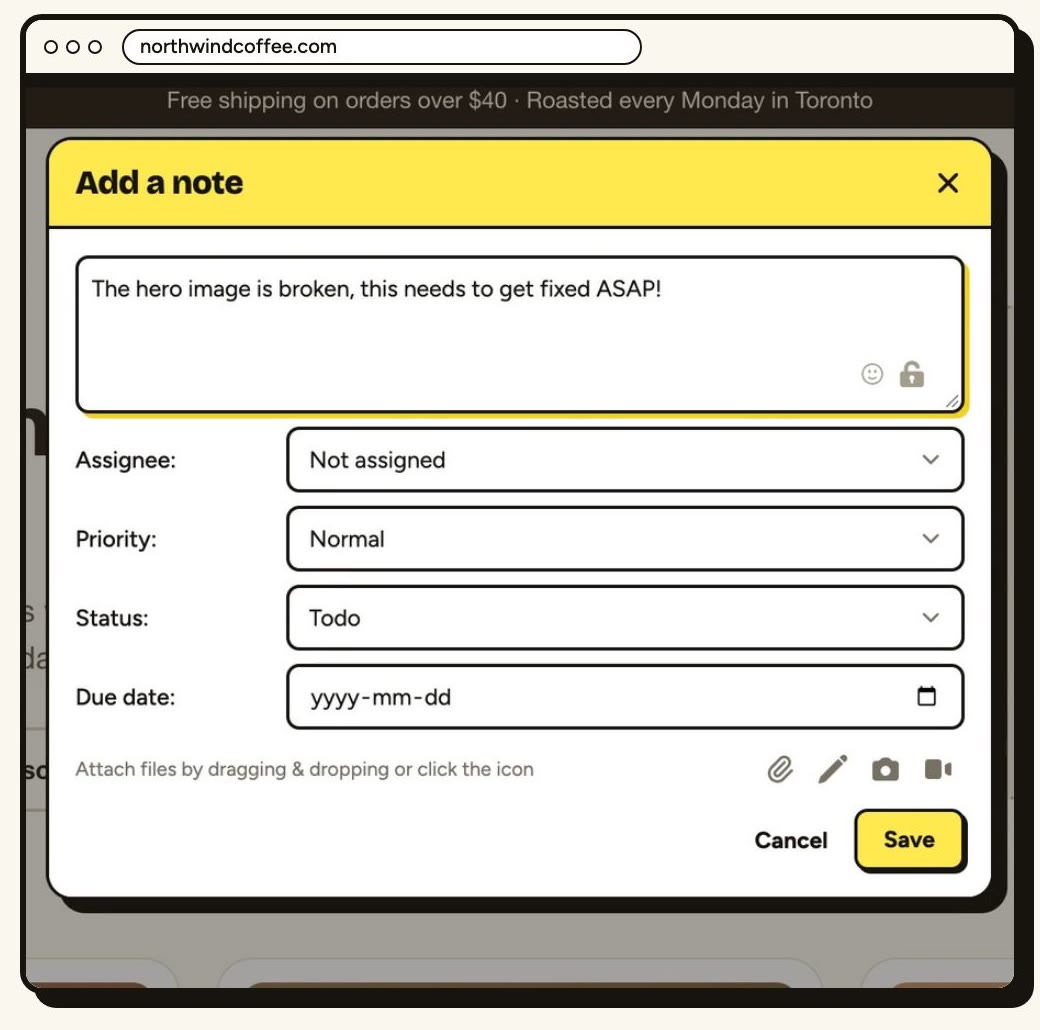
See a problem. Add a note.
With PageProofer you can add screenshots, screen recordings and attachments. It all gets sent to Trello along with important browser info to make fixing the bug easier.
Collaborate with your team
You don't need to jump back and forth between your website and Trello when trying to track bugs. Spot a problem, notify the web developer and collaborate, all right on your website.
PageProofer is a fantastic tool for our development toolbox. It gives us and our clients one simplified point for feedback creation, tracking, and sign-off.
 Joe Atomic Mouse
 PageProofer makes internally QAing our clients' websites easier, quicker, and more organized. Direct integrations mean we don't have to manage another system.
 Mike Antenna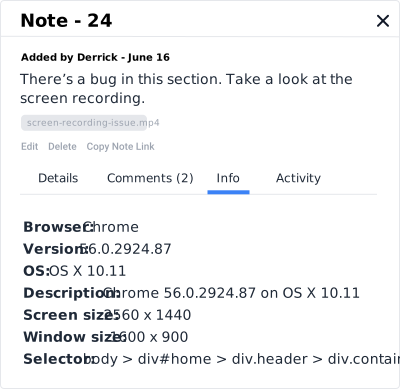
Take the guess work out of debugging
On every note that is created, we capture the browser information, screen size and operating system info. You don't need to guess about which environment a bug occurred in. You can quickly see all the important information (browser type, version, OS, screen size).
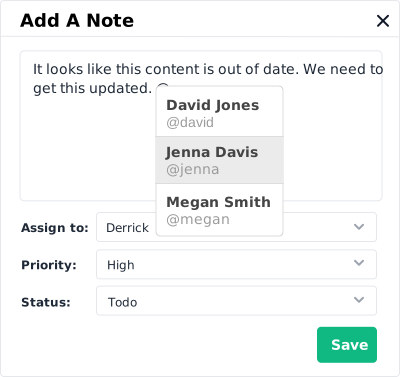
Team collaboration
With note commenting and @ mentions it's easy to keep your whole team in the loop between PageProofer and Trello. As comments are added in PageProofer, they automatically get added to the Trello card.
How to set up a Trello board for bug fixes
To use Trello for bug fixes, create one board for the website and give it a list for each stage a bug goes through:
- Reported: new bugs that nobody has picked up yet.
- In progress: someone is working on the fix.
- Fixed: the fix is done and ready to check.
- Verified: someone has checked the fix on the live site.
Connect PageProofer to the board and each new note arrives as a card in the first list, Reported. The card includes the screenshot plus the browser, operating system and screen size the bug was reported in, so whoever picks it up can move it across the board without chasing for more details.
Trello bug tracking when coding agents build the site
Coding agents now build much of the web, and they often miss things that only show up in a real browser. A person still needs to review the live site, and PageProofer connects that review to both your Trello board and your agent.
Say a coding agent builds a new landing page. Someone on your team reviews it on the live site and pins notes: the spacing under the hero is uneven, the hover state on the signup button doesn’t change, and the pricing table breaks at tablet widths. Each note goes to Trello as a card, with its screenshot and browser info, so the whole team can see what’s outstanding. At the same time, the PageProofer MCP server lets Claude Code or Cursor read the same notes, fix the issues and reply. A person then checks the fixes on the live page and moves the cards to Verified.
The developers we work with are loving it!
 Jessica Granuldisk
 My web dev guys love your service - they call it a game changer. :-)
 Chenxi TwistLock
 The feedback tool I've been looking for.
 Pontus Befound
 Trello bug tracking FAQ
Can you use Trello for bug tracking?
Yes. Many teams track bugs on a Trello board with a list for each stage, such as Reported, In progress, Fixed and Verified. PageProofer fills in the cards for you: each note pinned on your website becomes a Trello card with a screenshot and browser info.
Does Trello have a built-in bug tracker?
Not as such. Trello is a Kanban board, so you can organise bugs as cards in lists, but it doesn’t capture anything from your website. PageProofer adds that side: notes pinned on the live page, with a screenshot and the browser, OS and screen size, sent to your board.
Can clients report bugs without a Trello account?
Yes. Clients can leave feedback on your website as guests, with no account needed, and their notes still reach your Trello board. See guest feedback for how it works.
Which PageProofer plan includes the Trello integration?
Integrations, including Trello, are included on the Team plan ($89/month) and the Agency plan ($199/month). Every plan comes with a 15-day free trial, no credit card required.
Join thousands of other top designers and developers and start using PageProofer to make website feedback easier!
Sign up now for your free 15 day trial. No credit card required.