
UAT Meaning: User Acceptance Testing Explained for Websites
“UAT” shows up on almost every website project plan, usually in the box right before “Launch”. A lot of clients have no idea what they’re being asked to do when they get there. Here’s the UAT meaning in plain English, who does it, how it differs from QA, and a sign-off checklist you can copy.
UAT meaning: the short answer
UAT (user acceptance testing) is the final stage of a project, where the client or end users check the finished product against what was agreed and decide whether to accept it.
In plain English, UAT is the client’s turn to say “yes, this is what we asked for.” It’s about acceptance and sign-off, not hunting down every last bug. It’s done by people outside the build team.
On a website project, that means your client clicking through the staging site before launch. They fill in the forms, read the copy and check it on their own phone.
You’ll also hear “UAT” used for the place where this happens, as in a “UAT server” or “UAT environment”. On most website projects, that’s your staging site. More on that below.
What is UAT testing, in plain terms
If you want to define UAT properly, take it one word at a time.
User. The client, their staff or real end users. Not the designers and developers who built it. You know the site too well to use it like a stranger would.
Acceptance. A yes or no decision, made against the requirements or scope you agreed at the start. It’s not “do I like it” and it’s not “could it be better”. It’s “does it do what we said it would”.
Testing. Doing real tasks on the real site. Submitting the contact form. Finding the pricing page. Booking a demo. Nobody is reviewing code.
Yale’s IT team put it well in their UAT guidance: acceptance testing validates requirements “from a source outside the project team”. That’s the whole point. The people who built it check their own work during QA. Someone else decides whether to accept it.
For agencies, there’s also a money side. UAT sign-off is often written into the contract, and it’s usually what triggers the final invoice. So it pays (literally) to run it well.
You’ll see long lists of acceptance testing types online. Most of them belong to enterprise software rollouts. The three that matter for website work are:
- Alpha testing: an early version tested internally or by a small trusted group before anyone else sees it.
- Beta testing: real users try a near-finished site, often a soft launch to a limited audience, and report what they find.
- Contract acceptance testing: the site is checked against the contract or statement of work, item by item, before sign-off.
UAT vs QA: what’s the difference?
This is where most project plans get muddy. QA is your check. UAT is the client’s acceptance. Both matter, and they answer different questions.
| QA | UAT | |
|---|---|---|
| Who does it | Agency team or developers | Client or stakeholders |
| When | During and after the build | After QA, before launch |
| The question it answers | ”Is it built right?" | "Is it what we asked for?” |
| Focus | Bugs, standards, cross-browser behaviour | Business requirements, content, real tasks |
| Environment | Dev or staging | Staging or UAT environment |
| Output | A bug list | Sign-off, or a list of changes |
The order matters. QA should finish before UAT starts. If you send a client a site with broken forms and missing images, they’ll spend their UAT time reporting your bugs instead of checking the things only they can check, like whether the copy is right and the booking flow matches how their business works. It also doesn’t do much for their confidence in you.
PageProofer is a fantastic tool for our development toolbox. It gives us and our clients one simplified point for feedback creation, tracking, and sign-off.
 Joe Atomic Mouse
 Who does UAT on a website project
On a typical website build, these are the people involved:
- Client decision-maker. The person who signs off. Usually the owner, marketing lead or project sponsor.
- Client content owners and department reps. They check copy, forms and workflows in their area. Sales checks the demo form, HR checks the careers page.
- Real end users, if you can get them. Even two or three customers clicking around will find things nobody else does.
- Agency project manager. Plans UAT, briefs the testers, triages feedback and keeps it moving.
- Developer or coding agent. Fixes what comes back.
- Agency designer. Does a visual pass on anything that changed during fixes.
One practical tip: name one person on the client side with sign-off authority. Otherwise you get the loop where the marketing manager approves a change, the CEO sees it on Friday and reverses it. I’ve been in that loop. It’s not fun.
Also remember that many clients have never done UAT. They don’t know what to check or how to report it. Briefing them is your job, not theirs.
When UAT happens in a website build
Here’s where UAT sits in a typical project:
- Discovery and scope
- Design
- Build
- Internal QA
- UAT on staging
- Fixes and verification
- Sign-off
- Launch
What’s a UAT environment? For websites, it’s a staging URL that mirrors production as closely as possible: same hosting setup, same plugins or integrations, and real content. Not lorem ipsum. If the client tests with placeholder text, they’re not really testing.
How long does UAT take? As a rough guide, a few days for a small brochure site and up to two weeks for a larger site with forms, integrations and lots of pages. That’s guidance, not a rule. What matters more is setting a clear deadline up front, because open-ended UAT has a way of becoming open-ended redesign.
Why UAT matters more when AI agents build the site
A lot of agencies and developers now build with coding agents like Claude Code and Cursor. They’re fast, and the code usually passes its checks. But agents reliably miss the problems that only show up in a real browser:
- Spacing and alignment that’s slightly off
- Buttons and links that don’t click properly
- Hover and focus states that are missing or wrong
- Overlapping elements
- Animations and effects that aren’t dialled in
- Layouts that break at certain screen sizes
A person spots these in seconds. An agent reading its own code often doesn’t spot them at all.
That makes UAT more important, not less. It’s the human review step in an agentic workflow. The loop looks like this:
- The agent builds the site or the change.
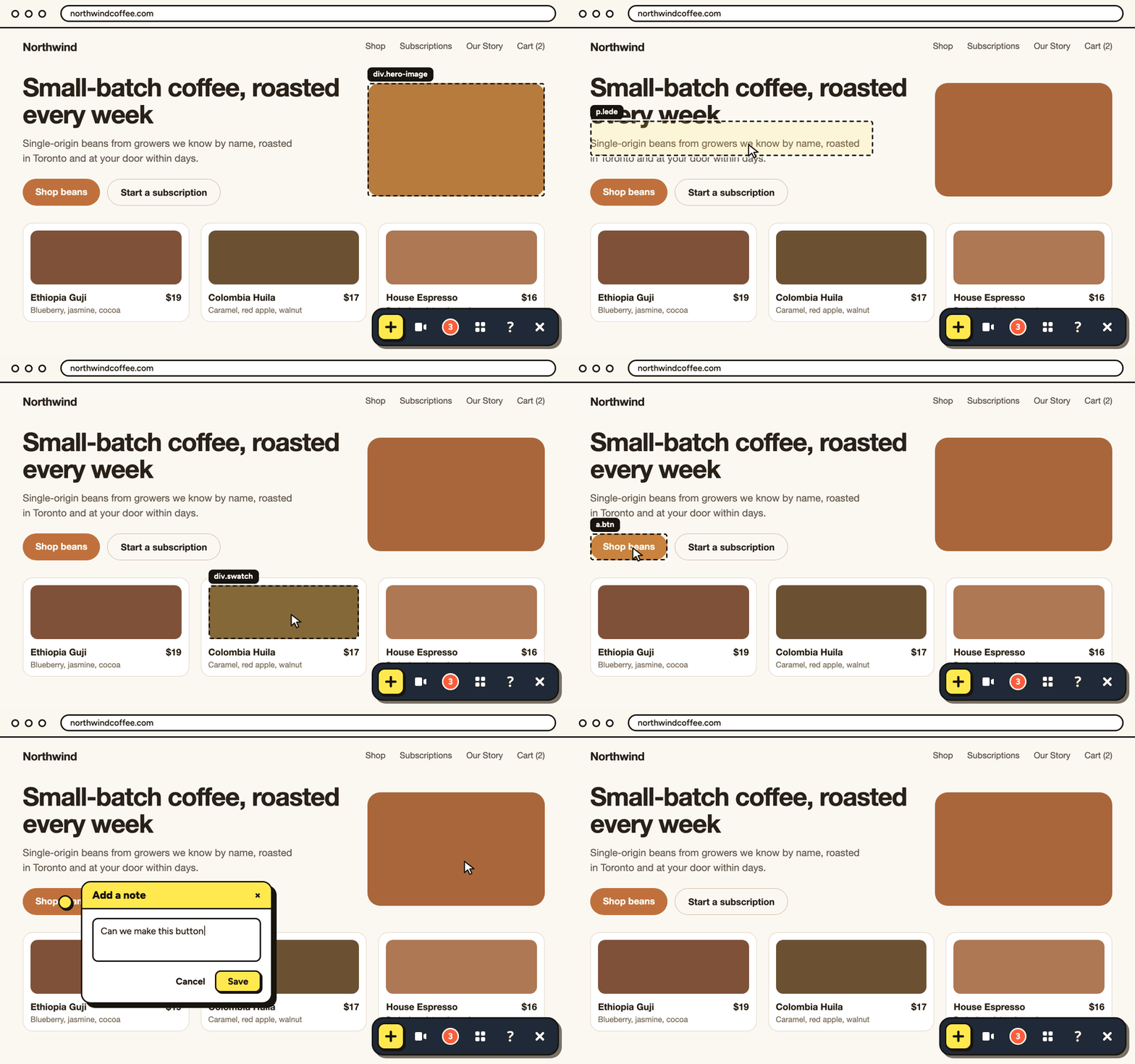
- A person reviews the live site and pins notes on what’s wrong.
- PageProofer’s MCP server hands those notes to the agent. The MCP server is simply a connection that lets the agent read each note, with its selector, screenshot and browser info, so it knows exactly what to fix and where.
- The person verifies the fix on the live page.
No copying feedback into prompts, no retyping, no guessing which button the client meant. You can hand feedback straight to your AI agent and keep a human in charge of what gets accepted.
How to run UAT on a website: step by step
Here’s the process I’d use on any website UAT. For a fill-in-the-blanks version, grab our UAT plan template.
-
Agree scope and acceptance criteria. Pull them from the proposal or statement of work. If it wasn’t in scope, it isn’t a UAT fail. Write this down before testing starts, not after.
-
Prepare staging and finish internal QA first. Load the final content, connect the real forms and integrations, and fix your own bugs. The client should see something you’d be happy to launch.
-
Write test scenarios as real tasks. “Submit the contact form on mobile.” “Find pricing from the homepage.” “Sign up for the newsletter and check the confirmation email.” Tasks get better feedback than “have a look around”.
-
Brief the client. Tell them what to check, when it’s due and how to leave feedback. A short email and a five-minute call go a long way. Many clients appreciate being told what not to worry about, too.
-
Collect feedback directly on the page. This is where most UAT falls apart. Feedback arrives as emails, spreadsheets and screenshots with arrows, and half of it says “the button doesn’t work” with no hint of which button. With PageProofer, you can let clients leave feedback as guests, with no account needed. They click the spot on the staging site and type a note, like a sticky note on a print proof. Each note records two kinds of detail:
- What they actually saw. The screenshot is taken from the reviewer’s own screen, pixel for pixel. It isn’t a re-rendering from a screenshot service, where the exact detail they’re complaining about (a font that didn’t load, an overlap at their window size) can quietly disappear.
- What they were using. The element’s CSS selector and HTML (basically its exact address on the page), plus browser, OS, device and screen size, and any console and network errors, are captured automatically. You won’t have to ask “what were you using?” Here’s more on the console errors and page details captured with each note.
For things that are hard to describe in words, like an animation that stutters, reviewers can send a screen recording instead.
-
Triage. Sort every note into one of three piles: a bug, a change request within scope, or out of scope. Out-of-scope items go into a separate change request so they don’t hold up sign-off.
-
Fix. Your developers work through the notes, or a coding agent reads them through PageProofer’s MCP server, makes the fix and replies to the note. Either way, the fixer gets the selector and screenshot, not a vague email.
-
Verify each fix on the live page. A person checks the fix in a real browser and closes the note. Don’t skip this, especially for agent fixes. “Fixed” and “looks right” aren’t always the same thing.
-
Get written sign-off. An email saying “approved for launch” with a date is enough for most projects. Attach the list of any minor open items and who owns them.
UAT entry and exit criteria
Entry and exit criteria stop UAT starting too early or dragging on forever.
Entry criteria (before UAT starts):
- Internal QA is complete, with no open critical bugs
- Staging matches the production setup
- Final content is loaded
- Test scenarios and acceptance criteria are agreed
- Testers are briefed and have access
Exit criteria (before sign-off):
- All scenarios have been run
- No open critical or high-priority issues
- Remaining minor items are logged with an agreed owner and date
- Out-of-scope requests are moved to a change request
- Client sign-off is recorded
Certainly the best existing tool to get quick feedback on sites under development. I have been using PageProofer for 4 months now and we have saved a considerable amount of time in processing customer requests. This tool is functional, simple and fun for customers.
 Lacroix Newp
 Website UAT sign-off checklist
Copy this into a doc and send it to your client with the staging link. It’s written for them: what they confirm, not your QA technicals.
Content
- All copy is correct and approved
- Images are final and look right
- Legal pages are in place (privacy policy, terms, cookie notice)
- Contact details, addresses and phone numbers are correct
Layout and screen sizes
- Pages look right on mobile, tablet and desktop
- Nothing overlaps or gets cut off
- Spacing looks consistent from page to page
Interactions
- Every button and link goes where it should
- Buttons and links change on hover, and show a visible outline when you tab to them
- Menus open and close properly, including on mobile
- Animations look smooth and intentional
Forms and integrations
- Form submissions arrive in the right inbox
- Confirmation messages and emails appear
- CRM, newsletter or booking connections work end to end
Browsers and devices
- Checked on the browsers and devices your team and customers actually use
Basic accessibility
- You can move through the site with the keyboard alone
- You can always see where you are when tabbing
- Images have sensible alt text
Sign-off
- Named approver
- Date approved
- List of open minor items, with owners and dates
Need the full plan behind the checklist (testers, scenarios, device matrix and severity levels)? It’s all in the UAT plan template.
Tools for running website UAT
There are three common ways to collect UAT feedback, and they’re not equal.
Email and spreadsheets. Free and familiar. But feedback arrives without context: no URL, no screen size, no clue which “Learn more” button they meant. You spend more time decoding than fixing.
Screenshot tools. Better. You can see roughly what they saw. But you still don’t know the browser, the device or the exact element, and the screenshots end up scattered across email threads.
Visual feedback tools. Clients pin notes directly on the page, and the technical details come along with each note. This is the approach built for UAT. If you want the wider picture, here are website feedback tools compared.
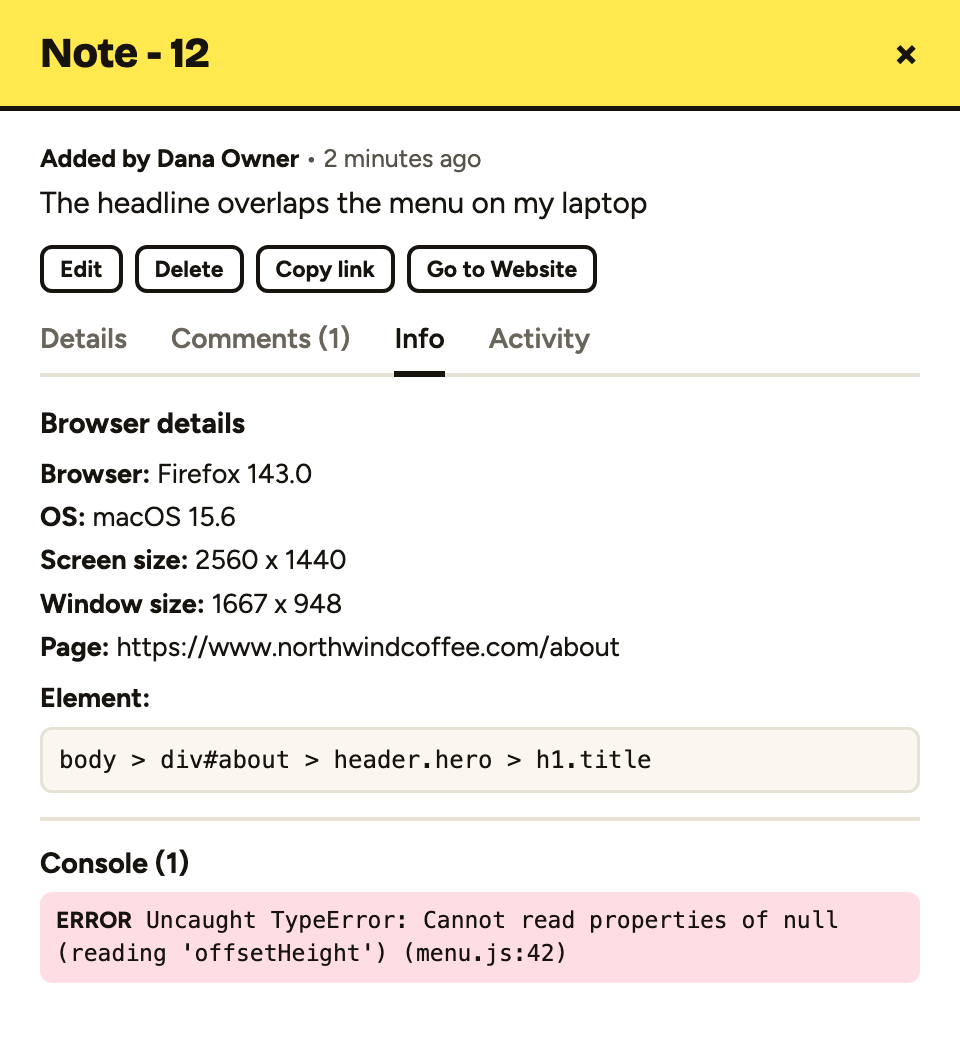
PageProofer is the one I built for this job. For website UAT, it gives you:
- Guest feedback. Clients pin notes on staging with no account.
- The details that matter. A screenshot of exactly what’s on their screen, plus the selector, HTML, browser, device and console info captured automatically.
- Unlimited sites on every plan. Every staging site, every client.
- Integrations with Trello, Asana and Basecamp, so notes land where your team already works.
- The MCP server, so coding agents like Claude Code and Cursor can read, fix and reply to notes.
Pricing (as of October 2026): Freelancer is $39/month for 5 users. Team is $89/month for 25 users and includes integrations. Agency is $199/month for unlimited users, custom branding and priority support. Extra users are $5/user/month, and annual billing gives you 2 months free. See PageProofer pricing for current details. There’s more on getting client sign-off on live sites on the blog.
Pageproofer is the only way clients should review a website! It's actually quite fun.
 Harry Harry's Digital Bar
 UAT FAQ
What does UAT stand for?
UAT stands for user acceptance testing. It’s the final stage of a project, where the client or end users check the finished product against what was agreed and decide whether to accept it. In website projects, it usually happens on the staging site just before launch, and it ends with the client’s sign-off.
What is UAT testing in simple terms?
UAT is the client’s chance to try the finished website and confirm it does what they asked for. They do real tasks, like filling in forms and finding key pages, rather than reviewing code. If it matches the agreed scope, they sign off. If not, they send back a list of fixes or changes.
What is the difference between UAT and QA?
QA is the agency’s own check that the site is built right: bugs, standards and cross-browser behaviour. UAT is the client’s check that it’s what they asked for: content, requirements and real tasks. QA comes first and produces a bug list. UAT comes after and produces sign-off or a change list.
Who is responsible for user acceptance testing?
The client owns the decision, and one named person on their side should have sign-off authority. Their content owners and, ideally, a few real users do the testing. The agency project manager plans UAT, briefs testers and triages feedback, while developers or a coding agent fix the issues.
What is a UAT environment?
A UAT environment is where acceptance testing happens. For websites, it’s usually a staging URL that mirrors the live setup as closely as possible, with the same hosting, integrations and real content. Testing there means clients can check everything properly without touching the live site or its visitors.
How long should UAT take on a website project?
As a rough guide, a few days for a small brochure site and up to two weeks for a larger site with forms and integrations. It depends on size, the number of testers and how quickly fixes turn around. Set a clear deadline at the start so UAT doesn’t drift into a redesign.
Is UAT the same as beta testing?
Not quite. UAT is the client checking the site against agreed requirements before launch, and it ends in a formal sign-off. Beta testing puts a near-finished site in front of real users, often as a soft launch, to see how it holds up in the wild. Beta feedback is useful, but it isn’t sign-off.
What happens after UAT sign-off?
The site launches. Any minor open items from UAT are fixed on the agreed dates, and out-of-scope requests become a separate change request or a phase two. For many agencies, sign-off also triggers the final invoice, so keep the written approval and open-items list somewhere safe.
Run your next UAT round on PageProofer
If your UAT feedback still arrives as a pile of emails and screenshots with arrows, give PageProofer a try. Every plan has a 15-day free trial, no credit card, and unlimited websites.
The agent builds. A person checks. Then you launch.
Get UAT feedback you can act on
Clients pin notes on your staging site as guests. Every note comes with a screenshot, the element and their browser details. No credit card required.