
Website bug reporting for sites your AI agent built
Coding agents now build a lot of the web. Ask Claude Code or Cursor for a landing page, a pricing table or a whole marketing site, and you get working code in minutes. The code compiles, the tests pass and the agent tells you it’s done.
Then you open the page in a browser. The button text sits a few pixels too low. The menu covers the logo on a tablet. A card grid squeezes into one long column at a width nobody tested. Agents are good at writing code, but they reliably miss things that only show up when a real person looks at a real page.
A person spots these problems in seconds. The hard part is bug reporting: getting each problem back to the agent with enough detail to act on. A vague “the header looks weird” sends the agent guessing. A good website bug report tells it exactly which element, on which page, in which browser, and what’s wrong. This guide covers what that report needs, a template you can copy, and a loop that hands your notes straight back to the agent to fix.
What is a website bug report?
A website bug report is a written record of something on a site that doesn’t look or work as intended, with enough detail for someone (or an agent) to find and fix it. It names the page and element, describes what happened against what should have happened, and includes the browser details and a screenshot.
What a good bug report includes
Every item on this list answers a question the developer or agent would otherwise have to ask. Leave one out and the fix waits on a reply.
- Page URL. The fixer has to start on the right page, and many sites reuse the same component on dozens of them.
- The exact element. “The button” could be any of ten buttons; a CSS selector or a clear description points to one.
- What you did (steps to reproduce). Some bugs only appear after a click, a scroll or a form submit, so the fixer needs to repeat your path.
- What you expected vs what happened. Without both, the fixer can’t tell whether the page is broken or just not what you wanted.
- A screenshot or screen recording. A picture settles arguments about what “slightly off” means, and a recording shows timing problems a still image can’t.
- Browser, OS and screen size. Plenty of layout bugs only happen in one browser or at one width, and the fixer can’t reproduce them without matching your setup.
- Any console or network errors. A JavaScript error or a failed request is often the real cause of a button that “does nothing”.
- Priority. The fixer needs to know whether this blocks launch or can wait until after, especially with a long list.
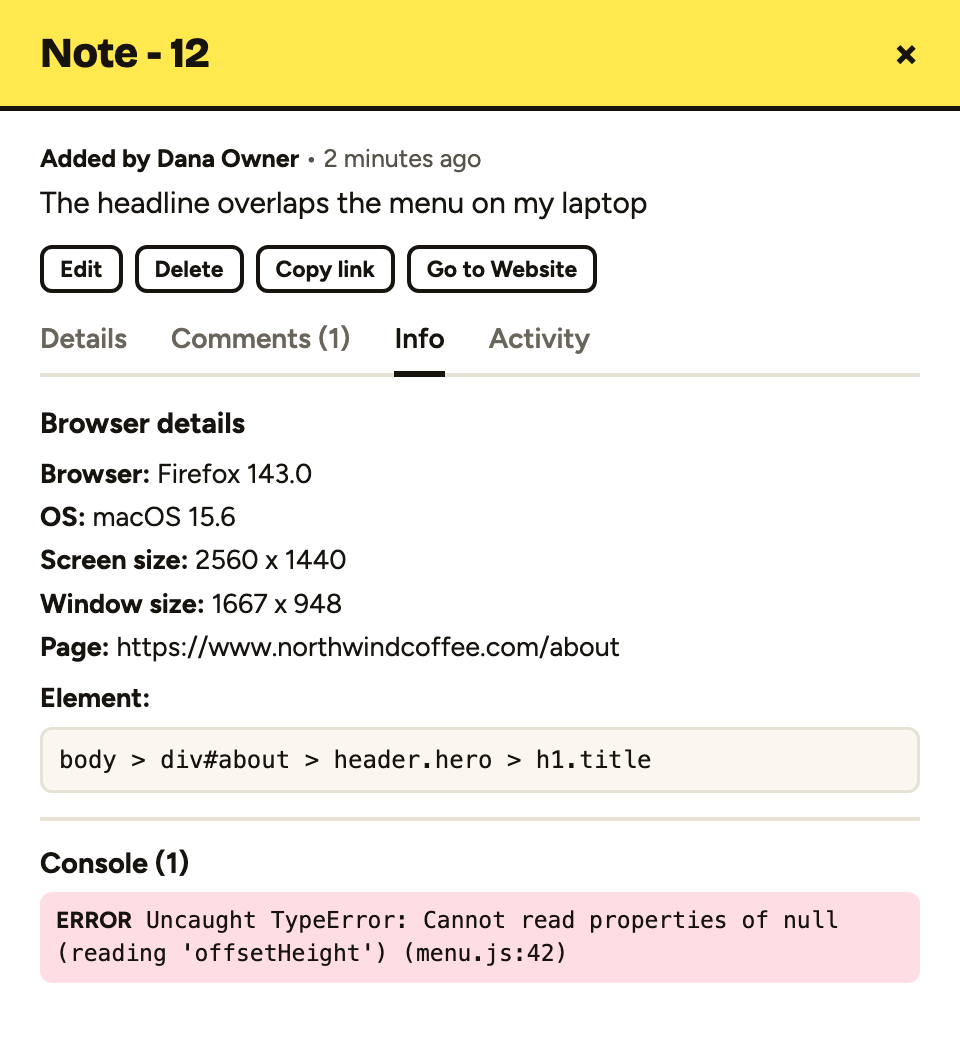
Bugs coding agents miss, and humans catch in seconds
An agent checks its work by reading code and running commands. It usually doesn’t look at the rendered page the way a visitor does. These are the problems that slip through most often.
Spacing and alignment that’s slightly off
An icon sits two pixels above the text beside it. A section has more padding at the top than the bottom. A heading doesn’t line up with the column below it. Nothing is broken in the code, so the agent has no reason to look. A person notices straight away, because the page just feels a bit wrong.
Buttons and links that don’t click properly
A button looks clickable but an invisible element sits on top of it. A link only works if you click the text, not the padding around it. A form button submits nothing. Agents rarely click through every control, so these turn up when a person tries to use the page.
Hover and focus states
Hover colours that clash, focus outlines that vanish, dropdowns that close before you can reach them. These states don’t show in a static view of the code, and keyboard focus is easy to forget entirely. Tab through a page and you’ll often find a control you can’t see when it’s selected.
Overlapping elements
A sticky header covers the top of a section when you jump to it. A cookie banner hides the main call to action. A long word pushes text out of its card and over the next one. Overlaps usually depend on real content and real screen sizes, which is exactly what an agent doesn’t see.
Animations and effects that aren’t dialled in
A fade-in that’s too slow, a slide that stutters, an element that jumps when the animation ends. An agent can write the animation code, but it can’t feel whether the motion is right. That takes a person watching it play.
Layouts that break at certain screen sizes
The design looks fine on a laptop and on a phone, but at a width somewhere in between the navigation wraps onto two lines or the grid collapses badly. Agents tend to test the obvious breakpoints, if they test at all. People use every width in between.
PageProofer makes internally QAing our clients' websites easier, quicker, and more organized.
 Mike Antenna
 A bug report template you can copy
Paste this into an email, a ticket or a chat message when you don’t have a dedicated tool. Fill in every field, even if the answer is “none”.
Title:
Page URL:
Element:
Steps to reproduce:
  1.
  2.
  3.
Expected result:
Actual result:
Browser / OS / screen size:
Console errors:
Screenshot or recording:
Priority: (blocker / high / medium / low)
Keep the title short and specific. “Pricing button overlaps FAQ heading on tablet” is far more useful than “Layout issue”. Report one bug per report, too. A list of six problems in one message is hard to assign, and the easy fixes end up waiting on the hard one. Separate reports can be fixed, checked and closed one at a time.
Why email, spreadsheets and screenshots slow bug reporting down
Most bug reporting still happens in email threads, chat messages and shared documents. They all have the same problems.
Messages are vague. “It’s broken on my phone” leaves out which page, which phone, which browser and what “broken” means. The developer has to reply and ask, then wait.
Details go missing. Nobody remembers to note their browser version or screen size, and a cropped screenshot hides the URL. Console errors never make it into an email, because the person reporting the bug doesn’t know they exist.
Threads get lost. Feedback arrives in five places, half of it gets fixed, and nobody is sure which half. A spreadsheet helps track the list, but someone still has to copy each report into it and keep it up to date.
When an agent is doing the fixing, this matters even more. An agent can’t walk over to your desk and ask what you meant. It works from the report you give it.
PageProofer is a fantastic tool for our development toolbox. It eliminates the need for multiple spreadsheets and pdfs to track change requests, and gives us and our clients one simplified point for feedback creation, tracking, and sign-off.
 Joe Atomic Mouse
 The bug reporting loop for agent-built sites
Here’s a loop that keeps people doing what they’re good at (spotting problems) and agents doing what they’re good at (changing code).
- The agent builds or changes the site. It writes the code and deploys it to a staging or live URL.
- A person reviews the live site and pins notes on the exact element with PageProofer. Use the embedded script or the Chrome/Edge extension. Clients can leave guest feedback without an account.
- Each note captures the details automatically. That includes the element’s CSS selector and HTML, a screenshot, browser and device info, and console and network errors. Nobody has to fill in a template.
- The agent picks up the notes. PageProofer’s hosted MCP server hands them to Claude Code, Cursor or another MCP agent. The agent finds the problem in the code, fixes it and comments on the note with what it changed.
- A person checks the fix. Fixed notes move to Review, so someone confirms the change on the site before the note is closed.
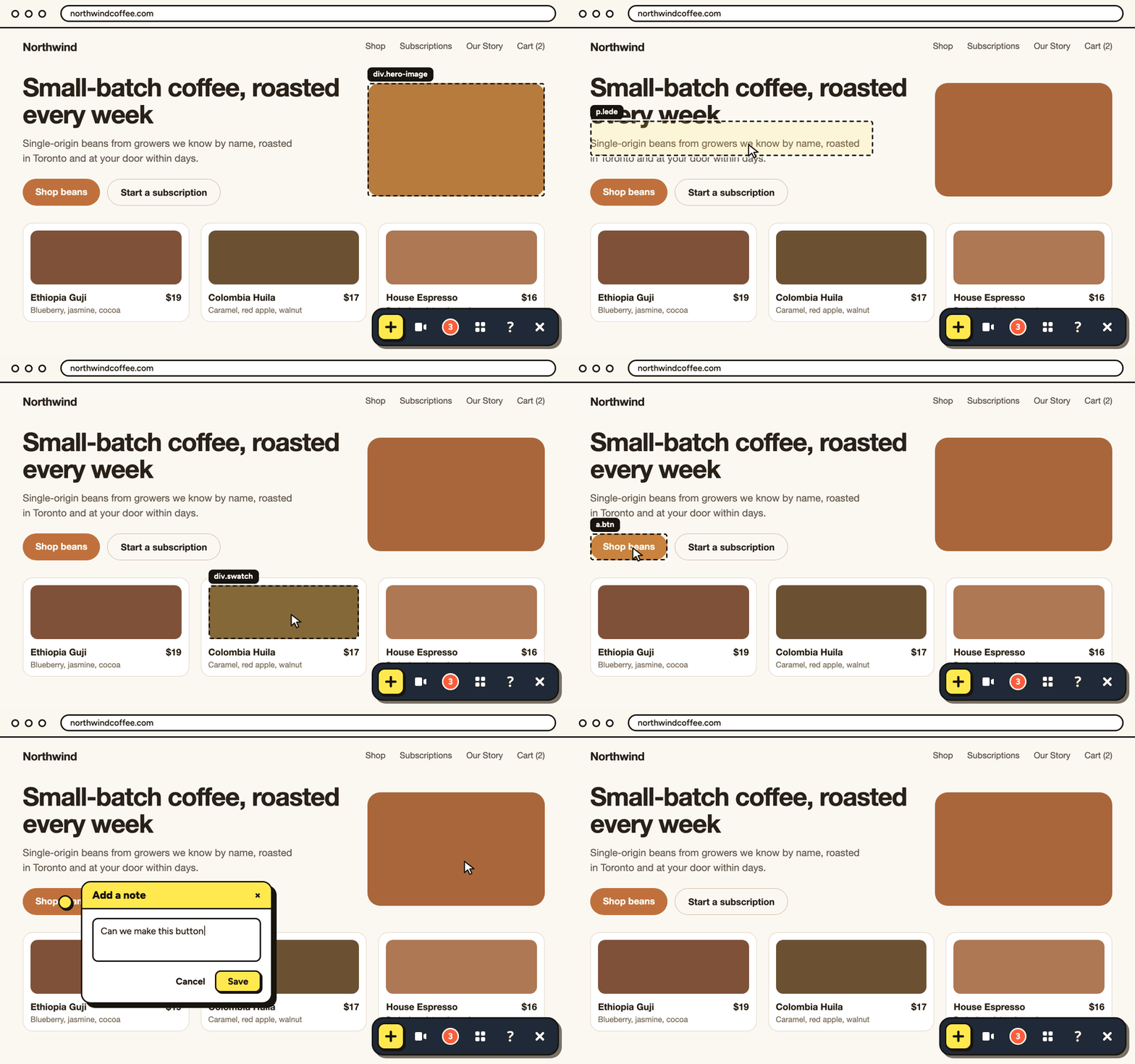
AI agent access is included on every plan at no extra cost. It takes about a minute to connect your AI agent, and you can see how PageProofer works with your AI agent for the full walkthrough.
Who reports website bugs?
On most web projects, bug reports come from four groups.
Clients during UAT. User acceptance testing is when the client checks the site does what they asked for. They know the business, not the browser, so their reports need to be easy to leave. Our UAT plan template covers how to run that round. With guest feedback, clients pin notes without creating an account.
QA testers. They work through the site methodically, across browsers and devices, and know how to write a clear report. They benefit most from a tool that captures the technical details for them.
Project managers. They spot problems while checking progress and need to pass them on quickly without losing track of them.
Developers. They find bugs in their own work and in each other’s, often while fixing something else.
Automated tests help too. Automated browser testing with Playwright MCP lets an agent click through a site and check it works. But automated tests don’t replace a person looking at the page. A test can confirm a button exists; it can’t tell you the button looks wrong.
PageProofer made our QA and feedback process so much easier. It saves us a ton of time, and is very easy to use. Highly recommended.
 Sandra Market 8
 Bug reporting vs bug tracking
Bug reporting is capturing the issue: noticing a problem and recording it with enough detail to act on. Bug tracking is managing that issue until it’s resolved: assigning it, prioritising it, fixing it and confirming the fix. You need both, and a good report makes tracking much easier. For the tracking side, see our guide to website bug tracking.
FAQ
How do I write a good bug report for a website?
Include the page URL, the exact element, the steps to reproduce, what you expected against what actually happened, a screenshot, and your browser and device details. Add any console errors and a priority if you can.
Can an AI coding agent fix bugs from a bug report?
Yes, if the report includes the element’s selector, HTML, screenshot and browser info. PageProofer’s MCP server gives agents like Claude Code and Cursor that context and lets them reply on the note with what they changed.
Do clients need an account to report bugs?
Not with PageProofer. Guests can leave feedback without an account, so clients can pin notes during review without signing up.
What’s the difference between bug reporting and bug tracking?
Reporting captures the issue. Tracking manages it until it’s fixed and verified.
Start reporting bugs your agent can fix
PageProofer plans start at $39/month, with unlimited sites on every plan and a 15-day free trial with no credit card. See pricing for the full plan details.
Turn every bug you spot into a fix your agent can make
Pin notes on your live site and hand them to Claude Code or Cursor to fix. No credit card required.