
Website Design Feedback Tool: Client Sign-Off on Live Sites
What a website design feedback tool does
A website design feedback tool lets clients click any element on a live or staging site and leave a comment pinned to it. The tool records the technical context automatically, including the element, the browser and the device, and the note comes with a screenshot of exactly what the client saw. Your developer can fix the issue without asking follow-up questions.
It replaces the usual web design feedback mess: a numbered list in an email, a screenshot with red circles, and messages like “the button on the right looks off” with no word on which page, which button or which phone.
The alternative is email hell or having really shoddy communication. I can trace just about every client problem I've ever had down to poor communication, and any tools or processes in place to counter that are a win in my book.
 Brennan Right Message
 This guide covers one job: getting design feedback and sign-off on the real, coded site. You’ll see when mockup feedback is enough, what to look for in a tool, how a full review round runs, and a checklist you can use with any tool. To see how this works in PageProofer, take a look at our visual feedback tool for design review.
Mockup feedback vs feedback on the live build
Many design feedback tools review static images. Others review working web pages. Both are useful, but at different stages of a project.
| Mockup feedback | Live-build feedback | |
|---|---|---|
| What’s reviewed | Static frames, images, PDFs | Coded pages on a staging or live URL |
| Responsive behaviour | Only the breakpoints someone designed | Every real screen width the client uses |
| Real content and fonts | Often placeholder copy and ideal-length headlines | Real copy, real images, fonts as the browser renders them |
| Interactions and hover states | Described or prototyped | Clickable, as users will experience them |
| Browser and device bugs | Can’t show up | Show up, and get reported |
| Technical data captured | Usually none beyond the frame | Element, browser, device, often console errors, plus a screenshot |
| Best project stage | Concept, layout and visual direction | Build, QA, pre-launch and post-launch |
| Typical examples | Figma comments, image and PDF proofing | Live-site annotation tools such as PageProofer |
Mockup tools are the right choice for early design. Comment on frames while changes are cheap. Once there’s a staging URL, though, the mockup stops being the thing you’re approving. Clients will find the problems mockups hide: a nav that wraps on their phone, a heading that breaks onto two lines, a form that doesn’t submit. That feedback needs to be pinned to the real page.

What to look for in a web design feedback tool
If you’re choosing a web design feedback tool for client review rounds, check these nine criteria. Each one affects how fast you reach sign-off.
- Clients can comment without an account. Every sign-up step costs you client feedback. PageProofer: guest feedback, no account needed.
- Comments pin to the element, not just x/y coordinates. Coordinates drift when the layout changes between screen sizes. PageProofer: captures the element’s CSS selector and HTML with each note.
- A pixel-perfect screenshot of the client’s actual screen. Some tools rebuild the page through a screenshot service, and details get lost along the way: the fonts the client’s browser loaded, dynamic or logged-in content, lazy-loaded images, the exact scroll position. When a client says “this looks off”, you need to see precisely what they saw. PageProofer: the screenshot is of the client’s own screen, not a re-rendering.
- Automatic browser, OS, device and screen size. You won’t have to ask “what were you using?” PageProofer: browser and device info captured on every note.
- Console and network errors. These turn “it doesn’t work” into something a developer can debug. PageProofer: captured automatically.
- Screen recording. Hover glitches and animation issues are hard to describe in text. PageProofer: screen recordings supported.
- Embedded script and browser extension. The extension covers sites where you can’t add code. PageProofer: both, with a Chrome/Edge extension.
- Sends tasks to your PM tool. Feedback should land where your team already works. PageProofer: integrations including Trello, Asana and Basecamp (Team plan and above).
- No per-site pricing. Agencies run many projects at once. PageProofer: unlimited sites on every plan.
To see how different tools score on these criteria, compare website feedback tools in our side-by-side guide.
Running a design review round on a live build, step by step
Here’s a full round in PageProofer, using a realistic example: a homepage redesign for a client, on a staging URL, with seven notes that cover layout, copy and a bug.
1. Add the site
Add the site to PageProofer in one of two ways:
- Embed script: paste the snippet into the site’s head, the same way you’d add any other script. There are install routes for WordPress, Webflow and Google Tag Manager. Anyone who visits the staging site can then leave feedback.
- Chrome/Edge extension: use this when you can’t, or don’t want to, touch the site’s code, such as a client’s live site or a locked-down platform.
For client rounds, the embed script is usually easier because the client doesn’t need to install anything.
2. Send the client the link
Send one staging URL and invite the client to leave notes as a guest. They don’t need an account or a password manager entry. See how to let clients leave feedback as guests.
Add three lines of instructions to the email:
Hover over anything you want to comment on. Click it and type your note. One issue per note, please.
3. The client leaves notes
As the client hovers, the element under the cursor is highlighted, so they can tell exactly what they’re commenting on: the headline, a single button or a whole section. They click it, type, and submit.
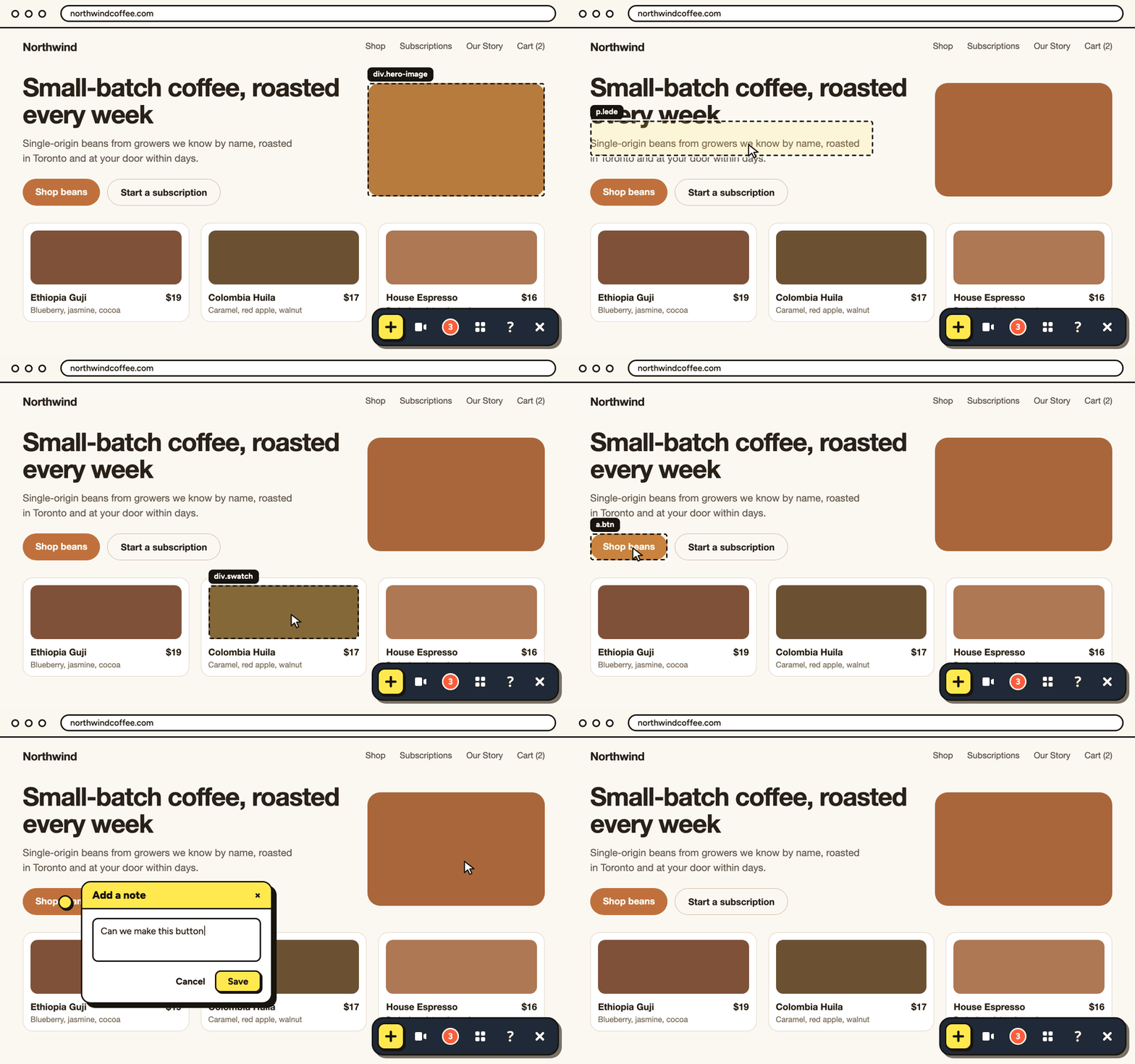
In our example round, the client leaves these notes:
- Mobile nav: “Menu covers the logo on my phone.”
- Hero headline: “Can this be bigger?”
- Hero subheading: copy change to new wording.
- Testimonial section: “Photos look blurry.”
- Pricing cards: “Middle card should stand out more.”
- Contact form: “Nothing happens when I click Send.”
- Footer: “Add our LinkedIn link.”
For note 1, a 20-second screen recording showing the menu opening says more than a paragraph would.
Pageproofer is the only way clients should review a website! It's actually quite fun.
 Harry Harry's Digital Bar
 4. See what arrives on your side
Each note arrives with context you’d otherwise have to chase:
- A screenshot of the client’s actual screen, not a re-render, so you see the same fonts, images and layout they did. For note 4, that tells you whether the photos really are blurry or just loaded late.
- The CSS selector and HTML of the element they clicked
- Browser and device info, so you know note 1 came from a small phone screen, for example
- Console and network errors, which for note 6 point straight to the failed form request
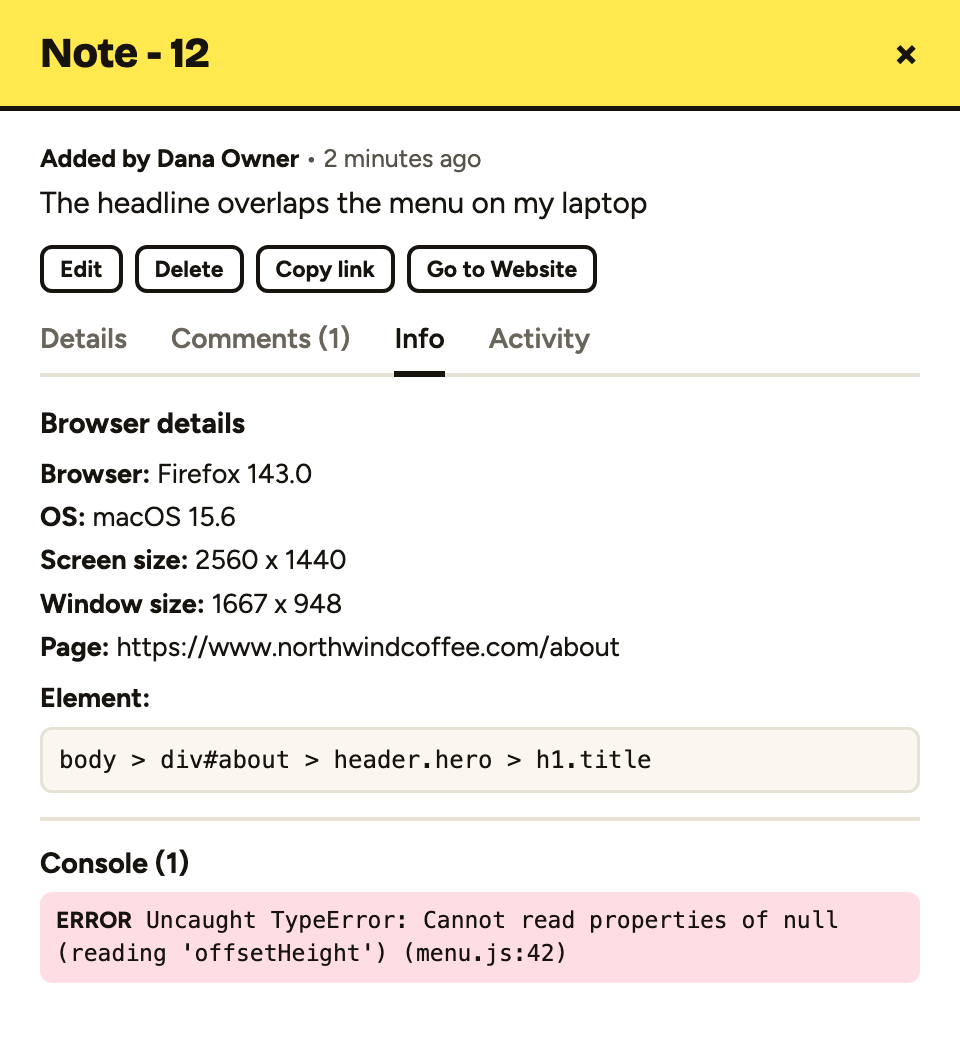
You didn’t send any “which phone?” or “which button?” emails, and you got no reply-all chains.
5. Triage
Aim to sort the round within 24 hours:
- Fix now: notes 1, 3, 4, 6 and 7. These are bugs, agreed copy and small additions.
- Discuss: notes 2 and 5. These are design calls, so reply with a recommendation before you change anything.
- Out of scope: none in this round. If a note asks for a new page, say so on the note and quote it separately.
6. Send notes to Trello or Asana
Push the “fix now” notes to your board so they sit alongside the rest of the sprint. You can send feedback notes to Trello or use the Asana integration, and Basecamp is supported too. Assign owners and due dates in your PM tool as you normally would.
PageProofer makes internally QAing our clients' websites easier, quicker, and more organized. Direct integrations mean we don't have to manage another system.
 Mike Antenna
 Integrations are included on the Team plan ($89/month) and above. The Freelancer plan doesn’t include them, so on that plan you’d triage inside PageProofer.
7. Fix and reply
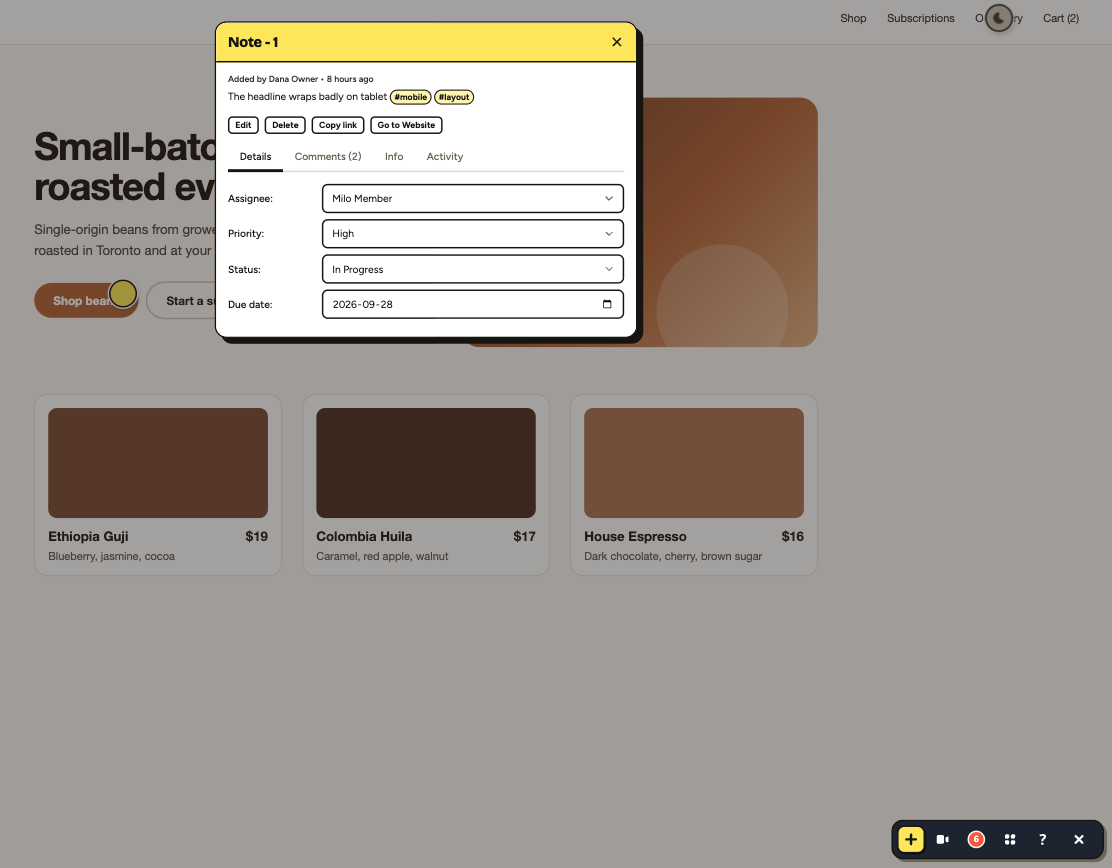
Fix each issue, then reply on the note with what changed, for example: “Nav now collapses below 400px. Please check on your phone.” For the design calls, reply with your reasoning. The note thread becomes a record of what was asked and what was done, which you’ll need for sign-off.
From feedback to client sign-off
Collecting notes is the easy part. Getting a clear “yes” takes structure.
Scope each round. Before you send the link, say which pages and breakpoints are in this round and what kind of feedback you want. “Round 2: homepage and pricing page, mobile and desktop, layout and copy only” stops the client re-litigating the logo. For a full pre-launch round, a UAT test plan template sets out scope, testers, scenarios and sign-off wording in one document.
Resolve notes visibly. Mark notes as resolved once they’re fixed and replied to, so the client can see what’s done and what’s still open. An open list that keeps shrinking reassures clients.
Do a final review pass. When every note in the round is resolved, ask the client for one last check of the in-scope pages: “Please confirm these are ready, or leave any final notes by Friday.”
Record sign-off in writing. Don’t rely on a thumbs-up in a call. Get the approval in writing, either as a final note on the page or as an email that says: “All open notes on the homepage and pricing page are resolved, and we approve them for launch.” File it with the project. If the client asks for changes after launch, you have a clear line between revisions and new work.
PageProofer is a fantastic tool for our development toolbox. It eliminates the need for multiple spreadsheets and pdfs to track change requests, and gives us and our clients one simplified point for feedback creation, tracking, and sign-off.
 Joe Atomic Mouse
 Optional: let your AI coding agent work through the notes
Design review rounds produce lots of small, well-defined fixes: a font size, some padding, a copy change, a missing link. They’re good candidates to hand to a coding agent.
PageProofer runs a hosted MCP server that lets coding agents such as Claude Code and Cursor read feedback notes, make the fix in your codebase and reply on the note. The captured CSS selector and HTML tell the agent exactly which element the client meant, and the screenshot and device info fill in the rest.
In the example round, you might hand notes 3 and 7 (the copy change and the footer link) to the agent and keep the mobile nav and the form bug for yourself. Review its changes as you would any pull request. Read how to fix website feedback with your AI agent.
Checklist: how to structure web design feedback rounds
Copy this into your project template. It works with any tool.
- Set the round’s scope: list the pages and breakpoints under review.
- Name the feedback type: layout, copy or bugs. Don’t mix all three in round one.
- Set a deadline: for example, “notes by Thursday 5pm”.
- Send one link with a three-line “how to leave a note” instruction.
- Ask for one issue per note.
- Ask clients to review on their real devices, the phone and laptop they actually use.
- Triage within 24 hours into fix now, discuss and out of scope.
- Group duplicates so the same issue isn’t fixed twice.
- Reply to every note, even if the reply is “Out of scope, quoting separately.”
- Limit the number of rounds in the contract. Two or three per phase is common.
- Close with written sign-off that confirms all open notes are resolved.
What PageProofer costs
Prices as of October 2026:
| Plan | Price | Users | Includes |
|---|---|---|---|
| Freelancer | $39/month | 5 | Unlimited sites |
| Team | $89/month | 25 | Unlimited sites, integrations |
| Agency | $199/month | Unlimited | Unlimited sites, integrations, custom branding, priority support |
Extra users cost $5 per user per month. Annual billing gives you 2 months free.
If you’re searching for a free design feedback tool: PageProofer doesn’t have a free plan. Every plan comes with a 15-day free trial with no credit card, which is enough to run a full review round on a real project. See PageProofer pricing.
FAQ
What are the best tools for collecting client feedback on website designs?
For live or staging sites, pick a tool that lets clients comment without an account, pins notes to elements, gives you a screenshot of the client’s real screen, and captures device info and console errors automatically. For early mockups, Figma comments or image proofing work well. To weigh specific options side by side, compare website feedback tools in our full guide.
What is the best tool for reviewing design changes with stakeholders?
Use a tool that matches what you’re reviewing. Use mockup comments for design direction and a live-site annotation tool once changes are coded. For stakeholder reviews on a real build, guest access matters most, because stakeholders rarely create accounts. Element-pinned notes keep everyone’s comments tied to the exact thing they’re discussing.
How do I get client feedback on a website design?
Send one staging link with a short instruction, a scope and a deadline. Ask the client to click the element they want to change and leave one issue per note on their own devices. Triage within a day, reply to every note, and close the round with written sign-off.
Can clients leave feedback on a website without creating an account?
Yes, with tools that support guest feedback. In PageProofer, clients open the staging link, click an element and leave a note without signing up. Removing that step is one of the biggest factors in whether clients actually leave feedback, especially busy stakeholders who only review once.
What’s the difference between design feedback in Figma and feedback on a live website?
Figma comments sit on static frames, which suits layout and visual direction early on. Feedback on a live website sits on coded pages, so it catches real content, responsive behaviour, interactions and browser bugs. Live-site tools also capture technical context such as the element, device and console errors.
Is there a free design feedback tool?
Some tools offer limited free tiers. PageProofer doesn’t have a free plan, but every plan includes a 15-day free trial with no credit card required. That’s enough time to run a complete client review round on a real project before you decide whether to pay.
How many feedback rounds should a web design project have?
Most agencies write two or three rounds per phase into the contract, for example two at design and two at build. Fewer, well-scoped rounds work better than open-ended ones. State the limit up front and quote extra rounds separately, so revisions don’t quietly turn into new work.
How do I get client sign-off on a website before launch?
Resolve every open note, then ask the client for a final review of the in-scope pages by a set date. Record approval in writing, as a final note or an email confirming that all open notes are resolved and the pages are approved for launch. File it with the project.
PageProofer makes it simple to manage visual feedback.